


HEIC is the file type many iPhones use for photos. It saves space, but some websites, upload forms and older software will not accept it. You can convert a HEIC file to JPG, or have your phone take JPEG photos from now on.
Stop an iPhone creating HEIC photos
Apple's instructions are:
- Open Settings, then tap Camera.
- Tap Formats, then tap Most Compatible.
New photos and videos then use JPEG or H.264. The option appears only on devices that can capture in the newer formats. It does not convert photos you have already taken. Apple also notes that photos may be converted automatically when you share or import them to a device that does not support HEIF.
Convert on a Mac with Preview
- Open the photo in Preview.
- Choose File > Export.
- In the Format menu choose JPEG and set the quality.
- Name the file, choose where to save it, and click Save.
Preview can export several images at once if you open them in one window and select them all in the sidebar.
Convert on Windows, Android or any browser
Whether Windows can open HEIC photos depends on the codecs installed. Microsoft distributes HEIF and HEVC extensions through the Microsoft Store, and one of them may carry a charge. Converting avoids installing anything:
- Open the HEIC to JPG converter.
- Choose one or more .heic or .heif photos.
- Set the JPG quality.
- Tick Keep photo details if you want the date taken, camera and location to stay in the file.
- Download each photo, or all of them as a ZIP.
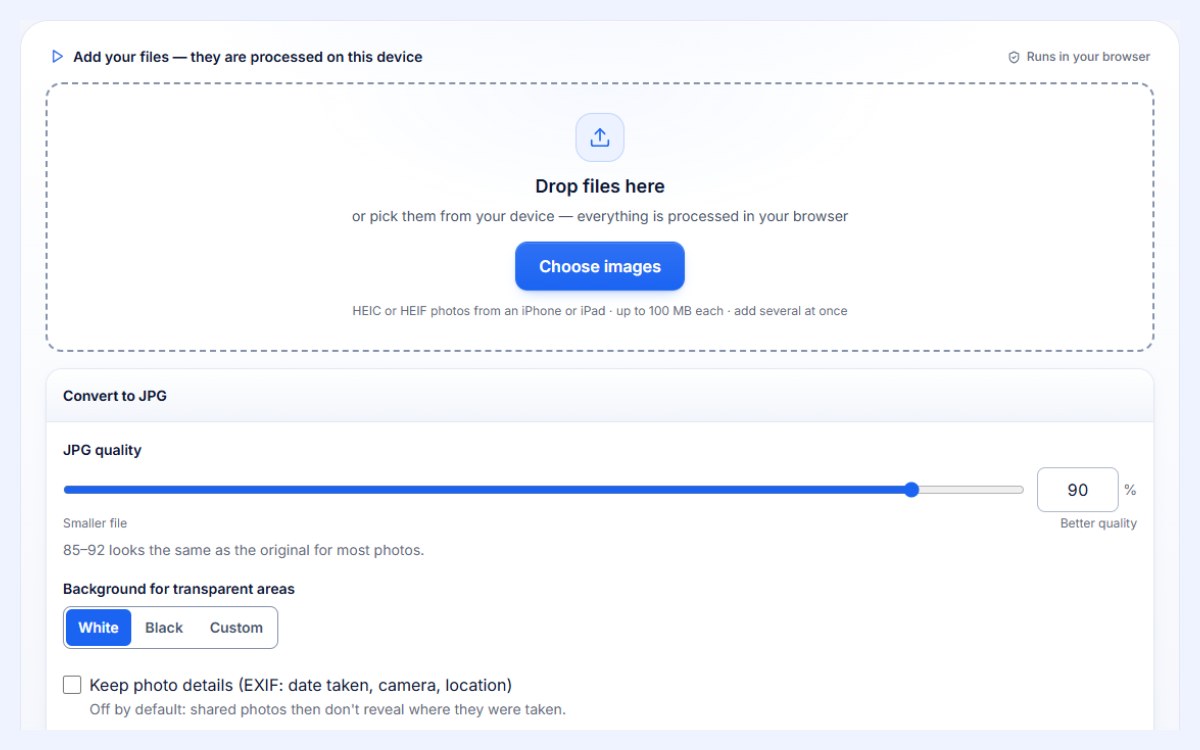
The conversion happens in your browser. Outside Safari, a decoder downloads the first time you convert, and large photos can take a few seconds each. Some Live Photo, burst or edited files may not decode; export those as JPG from the Photos app.
Check location data before sharing
Photos can record where they were taken. Leave Keep photo details off if you do not want to pass that on, and check the converted file's information if privacy matters.
After converting
A JPG can be larger than the HEIC it came from, because the formats compress differently. If a form has a size limit, follow how to reduce image size in KB. Keep your HEIC originals until you have checked the copies.
Frequently asked questions
Can I just rename .heic to .jpg?
No. Renaming changes the file name, not the data inside. The file has to be converted so it is actually encoded as JPEG.
Does changing the iPhone camera setting convert my old photos?
No. It affects new captures. Photos already saved as HEIC need to be converted or exported.
- #heic
- #jpg
- #iphone photos