


You can merge PDF on iPhone or Android in the web browser, without installing an app. This guide uses the Merge PDF tool, which joins the files on your phone instead of uploading them. Button names in your phone's own file picker vary between phones and software versions.
Put the files where your browser can find them
PDFs that arrive in email or chat apps are not always saved as files you can pick. Save each one first:
- Open the PDF.
- Use the app's share or download option.
- Save it to a folder you can find again, such as the Files app on iPhone or the Downloads folder on Android.
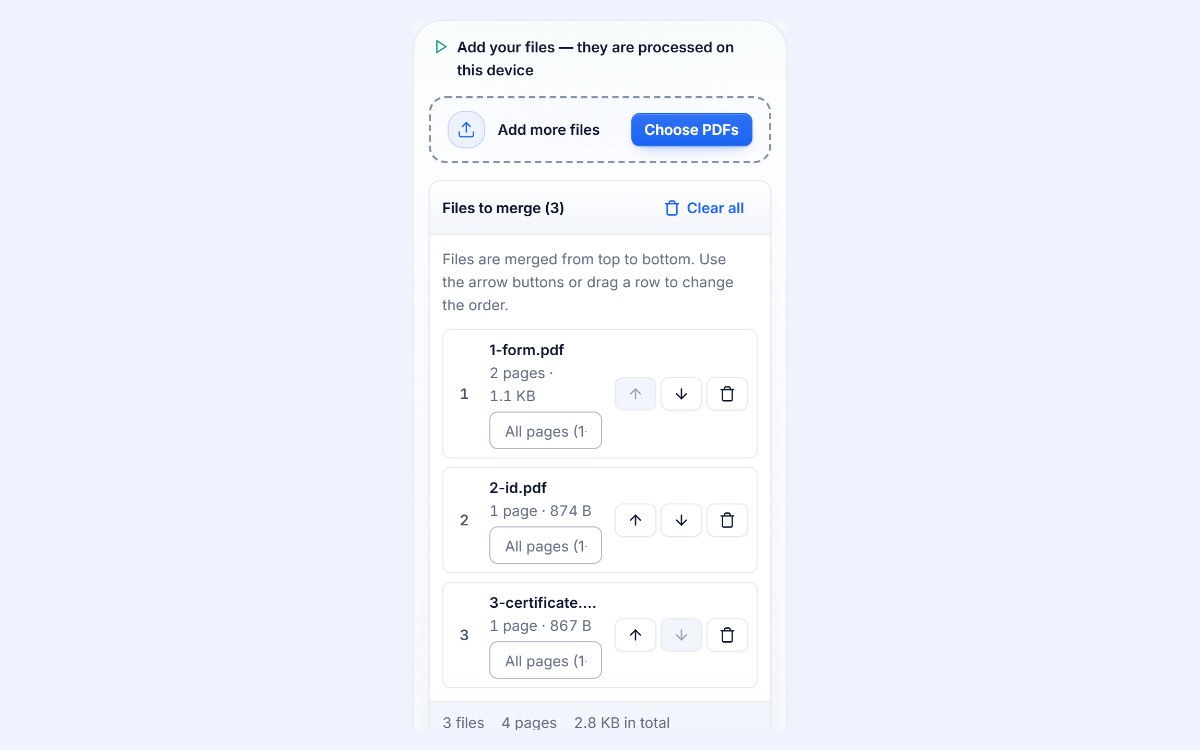
Give the files clear names. Names such as "1-form", "2-id" and "3-certificate" make the order easy to check.
Merge the files
- Open Merge PDF in your browser.
- Tap Choose PDFs and select the files. You can add more afterwards.
- Use the up and down arrows to set the order. The file at the top comes first.
- To include only some pages from a file, type them in that file's box, for example
1-3, 5. - Change the output file name if you want to, then tap Merge PDFs and Download.
Open and check the combined file
Find the download in your browser's downloads list or your phone's files app, and open it before sending.
- Is the page count what you expected?
- Are the documents in the right order and the right way up?
- Are signatures and small print still visible?
If a page is sideways, fix it with Rotate PDF.
What merging changes
Merging copies pages into a new document. Bookmarks are not carried over with this tool, and fillable form fields may stop being fillable. Fill in and save forms before you merge them. A digital signature on one of the source files should not be expected to remain valid in the new document.
If something goes wrong
- A file is missing from the picker: it may still be inside the email or chat app. Save it as a file first.
- The phone is slow or the page reloads: large scans need memory. Close other apps and merge in smaller groups.
- The result is too big to upload: merge first, then follow how to reduce PDF file size.
- Your documents are photos: turn them into a PDF first with the steps in how to convert images into a PDF.
Frequently asked questions
Can I merge a password-protected PDF?
Not while it needs a password to open. If you are allowed to, save an unprotected copy first, then merge that copy.
Are my documents uploaded when I merge them?
With the Merge PDF tool on this site, no. The files are joined inside your phone's browser.
- #merge pdf
- #iphone
- #android