
Bold Text Generator for Facebook Tutorial
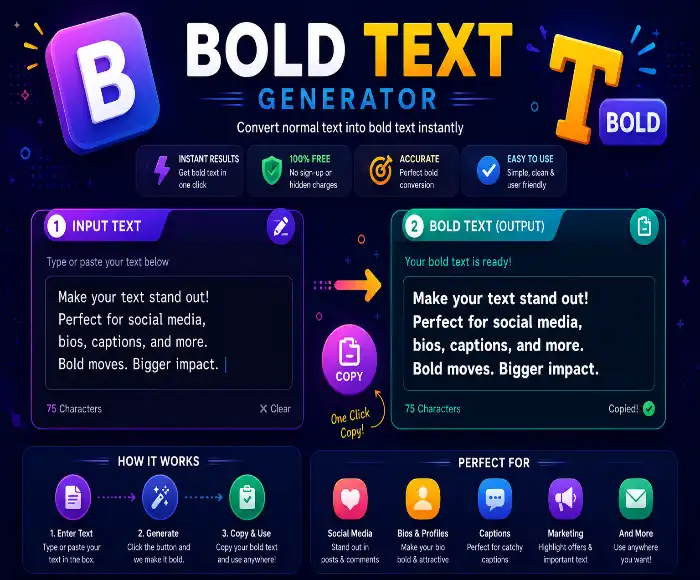
This tutorial explains the text bold styling tool step by step. It is written in a simple, natural way so you can read it like a human guide. The goal is to teach you how to use this tool for Facebook, Instagram, and other social apps. If you search for \u201cfacebook text style tool\u201d or \u201cfb bold text maker,\u201d this guide will help.
What Is This Tool?
This text styling tool creates bold Unicode text for Facebook posts and profiles. It converts plain text into different Unicode text styles. That means you type normal words, and the tool gives you bold, italic, or fancy styled versions that look cool in posts and profiles. It is not just a plain text bold generator, it is designed to give you several writing styles quickly.
How the Tool Works
The tool has a few main parts. Learning each part makes it easy to use the tool well.
- Style buttons at the top choose which text style you want.
- Input area on the left is where you type your text.
- Output area on the right shows the transformed text.
- Copy button lets you copy the result with one click.
- Clear button clears the input so you can start again.
Step 1 Choose Your Style
The first thing you do is pick a style. The tool offers several style buttons like Bold, Italic, Bold Italic, Script, Double Struck, and Fraktur. Each button shows a preview of the style. Click the one you like.
This is the most important part of the tool. If you want bold text for Facebook, choose the Bold or Bold Italic style. If you want something more creative, choose Script or Fraktur.
Step 2 Type Your Text
Type your message in the left box. You can use any text. For example, type “Hello World” or “Follow me on Facebook.” The tool will convert it automatically.
As you type, the tool updates the output in real time. That makes it easy to test and change text until it looks right.
Step 3 See the Output
The right-hand box shows the result. It shows your text in the selected style. It also shows word and character counts for both input and output.
For example, if you choose the Bold style, your phrase becomes bold Unicode text. If you pick the Script style, it looks like a handwritten font.
Step 4 Copy or Clear
After the output appears, click the copy button to copy it to your clipboard. Then paste the text into Facebook, Instagram, WhatsApp, or any place that accepts Unicode text.
If you want to start fresh, click the clear button. This removes your input and the output, so you can try a new phrase.
Style Options Explained
Each button changes the shape of letters. Here is what each one does:
- Bold: Makes letters thick and strong.
- Italic: Slants letters for a softer style.
- Bold Italic: Combines strong and slanted text.
- Script: Looks like cursive handwriting.
- Double Struck: Gives a bold block style.
- Fraktur: Uses old-style calligraphy letters.
If you search for \u201cbold text generator for Facebook,\u201d the Bold and Bold Italic options are the best choices for clear social media posts.
When to Use This Tool
This bold text generator for Facebook tool is great for:
- Facebook post headlines
- Facebook bio text
- Instagram captions
- Twitter posts
- Chat messages and profile names
If you want a quick way to make your text stand out, this is the right tool. It is also good for small blocks of text, not long paragraphs.
Best Practice Tips
- Use short sentences or phrases.
- Try different styles before choosing one.
- Read the text after copying it to make sure it looks good.
- If a style looks too hard to read, switch to the simpler Bold style.
- Use the example lines if you are testing the tool for the first time.
Remember that some platforms may show fancy Unicode text differently, but most major social sites support it well.
FAQ
Is this really a bold text generator for Facebook?
Yes. It creates Unicode text that works on Facebook, Instagram, and many other apps. The output is text, not an image.
Can I use this as a Facebook text style maker?
Definitely. Just choose the style, copy the result, and paste it into your Facebook post or bio area.
What is the difference between Bold and Bold Italic?
Bold makes text thicker. Bold Italic makes it thick and slanted. Both are good, but Bold is easier to read.
Does this work on mobile?
Yes. The tool should work in mobile browsers too, and the copied text can be pasted into mobile apps.
What if the output looks weird?
Sometimes the fanciest styles are harder to read. If that happens, use the Bold style or switch to a simpler option.
Final Summary
This bold text styling tool is simple and useful. It helps you make text look more attractive for social media and messaging. Even if you are not a designer, you can use it to create strong, bold, or creative text quickly. Just type, choose the style, copy, and paste.
Whether you want a bold text maker option or a Facebook text style maker for your profile, this tool is ready to help you make your text stand out.