
Online URL Encoder Tutorial
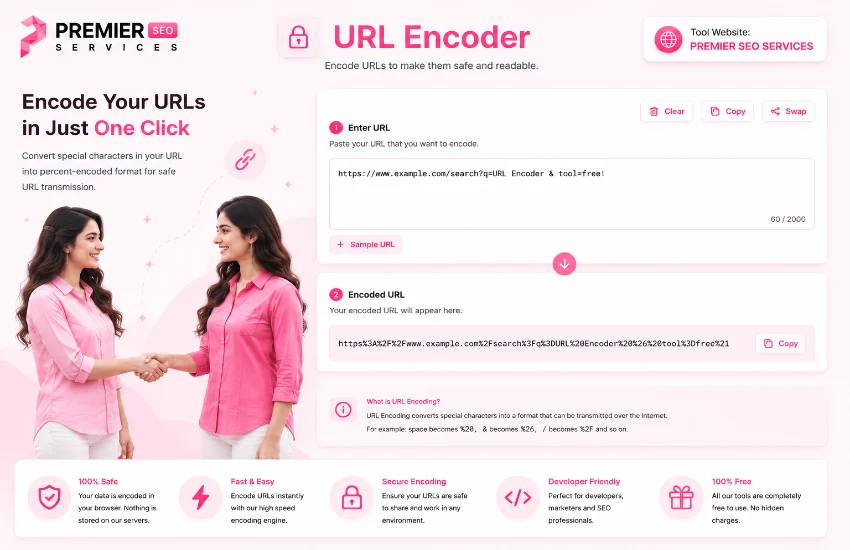
URLs carry more than just web addresses. Every query parameter, special character, space, and non-Latin letter needs proper encoding before it can travel safely over the internet. The URL encoder built into this page handles encoding, decoding, and URL structure analysis all in one place. You paste a URL or any text, choose your encoding mode, and the tool converts special characters into their percent-encoded form. It also decodes existing encoded URLs back to readable text, breaks down the full URL structure into components, and shows a live reference table of common encodings. This is the kind of tool every web developer, API integrator, and SEO professional reaches for multiple times a day.
If you need a dedicated encoder-decoder with additional options like selective character encoding and bulk URL processing, this tool extends the functionality with a clean dual-pane interface for side-by-side comparison.
Getting Started with the URL Input Area
The Input Field
At the top of the tool, a monospace text area welcomes your URL or text to encode the url. You can type directly into this field, paste a URL from your clipboard, or load the built-in example to see the tool in action. The placeholder text inside the box shows a sample URL with query parameters and Unicode characters, giving you an immediate idea of what the tool expects. The input supports any length of text, from single characters to full URLs with dozens of parameters.
Similar to URL encoding, Base64 encoding converts binary data into a safe text format. This tool handles the other major encoding scheme used in web development, especially for embedding images and files in JSON or HTML.
Loading the Example URL
Not sure what to encode first? The Example button populates the input with a real-world URL containing query parameters, Unicode text in Urdu, filter values, and a fragment identifier. This sample is designed to demonstrate every feature the tool offers. It includes spaces, special characters, non-Latin text, and multiple parameters. Once loaded, you can encode it, decode it, inspect the URL breakdown, and see exactly how the stats change with each operation.
Clearing and Swapping Content
The Clear button empties the input field, resets the footer stats, and hides the results panel in one click. The Swap button exchanges the input and output content. If you have encoded something and want to decode it back, or vice versa, one click moves the result into the input field without copying and pasting manually. This creates a smooth round-trip workflow for testing both encoding and decoding on the same content.
URLs embedded in HTML documents need proper escaping and formatting. This tool cleans up HTML markup, making it easier to spot and fix URL encoding issues within your web pages and templates.
Live Input Statistics
Below the input field, a footer shows three real-time counters. Total characters tells you the length of your input. Encoded chars counts how many percent-encoded sequences are already present, which is useful when working with partially encoded URLs. Spaces shows the number of literal space characters, helping you decide whether spaces need to be converted to percent-encoded or plus-form equivalents.
Understanding Encoding Options
Before you encode or decode, three dropdown menus give you precise control over the method used. Each option changes how the tool processes your input and affects the final result.
| Option | Choices | What It Does |
|---|---|---|
| Encode Mode | encodeURIComponent, encodeURI, Full encode | Determines which JavaScript encoding function is used |
| Space as | %20, + | Controls how spaces are represented in encoded output |
| Decode Mode | decodeURIComponent, decodeURI | Selects the decoding function for reversing encoded URLs |
Choosing the Right Encode Mode
The encode mode selector offers three distinct methods. encodeURIComponent is the most common choice because it encodes all special characters including those that have meaning in a URL path or query string. This is what you should use for encoding query parameter values. encodeURI preserves structural characters like forward slashes, colons, question marks, and hash symbols, making it suitable for encoding an entire URL without breaking its structure. Full encode converts every non-alphanumeric character to its percent-encoded form, useful for maximum compatibility in restrictive environments.
Percent Encoding vs Plus for Spaces
When encoding spaces, you have two options. The percent-20 format is the standard URL encoding that works everywhere. The plus format is specific to application/x-www-form-urlencoded content, which is the format used by HTML forms. If you are encoding data for a form submission or a query string that will be processed by a server-side framework, the plus format is often the expected convention. For all other purposes, percent-20 is the safer and more universal choice.
After encoding URLs for use in HTML attributes, you can preview how the rendered page looks with this HTML viewer. It helps verify that your encoded URLs work correctly inside links, forms, and scripts.
Decoding with the Right Method
The decode mode selector mirrors the encode modes. decodeURIComponent reverses encodeURIComponent encoding and handles all percent-encoded sequences. decodeURI reverses encodeURI encoding and preserves structural elements. In most cases, decodeURIComponent is the right choice because it can handle any percent-encoded content. If you know the URL was encoded with encodeURI, use decodeURI for accurate reversal.
Encoding and Decoding URLs
The Encode URL Button
Clicking the Encode button processes your input text to encode the url using the selected encode mode and space format. The tool scans every character in your input and converts special characters to their percent-encoded equivalents. Characters that are safe in URLs such as letters, digits, hyphens, underscores, periods, and tildes are left unchanged. All other characters get converted to a percent sign followed by their two-digit hexadecimal code. The result appears instantly in the output panel along with updated statistics and the URL breakdown.
The Decode URL Button
The Decode button reverses the encoding process. It scans your input for percent-encoded sequences and converts each one back to its original character. It also replaces plus signs with spaces before decoding, which handles the form-data encoding convention automatically. If the input contains invalid percent sequences, the tool displays a clear error message explaining what went wrong. This is especially useful when troubleshooting malformed URLs from external sources.
URLs in CSS files appear in background-image, font-face, and other properties. Keeping your CSS well formatted makes it easier to spot and fix encoding issues in your stylesheets.
Understanding the Results Panel
Statistics at a Glance
After encoding or decoding, four stat cards appear above the output. Input Chars shows the length of your original text. Output Chars shows the length of the result, which may be longer after encoding or shorter after decoding. Encoded Sequences counts how many percent-encoded sequences exist in the output. Operation tells you whether the last action was an encode or decode. These numbers give you immediate insight into how much your data changed during processing.
The Output Panel
The output panel displays the encoded or decoded result in a monospace font that wraps naturally and handles long strings without breaking. A Copy button next to the output copies the result to your clipboard with visual confirmation. The Use as Input button sends the result back to the input field, allowing you to chain operations. You can encode the url, inspect the result, then click Use as Input and decode it back to verify the round trip.
EncodeURIComponent and encodeURI are JavaScript functions at their core. This formatter keeps your JavaScript code clean and properly indented, making it easier to write and maintain URL encoding logic.
URL Breakdown Analysis
Parsing the Full URL Structure
The URL breakdown panel sits next to the output and parses the decoded input into its structural components. It shows the protocol, hostname, port, path, query string, and fragment identifier in a clean row layout. Each component is labeled clearly and displayed in a monospace font. This is invaluable for understanding how a URL is constructed and for debugging issues with specific parts of your web addresses.
Query Parameter Breakdown
If the URL contains a query string with parameters, the breakdown panel goes a step further and lists each query parameter on its own row. You see the parameter name and its value separately, making it easy to verify that each value is correctly encoded. This is especially useful when working with complex URLs that have multiple parameters, some of which may contain special characters or Unicode text.
Identifies the scheme (https, http) and domain name extracted from the URL.
Shows the server path and port number. Default ports like 80 and 443 are noted.
Displays the full query string and each individual parameter with its value.
Extracts the hash fragment used for in-page navigation and single-page apps.
When you need to extract or validate specific patterns within URLs, a regex tester helps you build and test expressions that match URL components, query parameters, and encoded sequences.
Common Encodings Reference Table
The results panel includes a built-in reference table showing the most frequently encoded characters and their percent-encoded equivalents. This table covers spaces, punctuation, URL structural characters, and special symbols. It updates automatically based on your current operation and serves as a quick reference when you need to look up an encoding without leaving the page.
| Character | Encoded | Description |
|---|---|---|
| Space | %20 or + | Whitespace between words |
| ! | %21 | Exclamation mark |
| # | %23 | Hash / Fragment identifier |
| & | %26 | Ampersand / Query separator |
| = | %3D | Equals / Key-value separator |
| ? | %3F | Question mark / Query start |
API responses often contain encoded URLs within JSON data. Converting that JSON to CSV helps you audit and verify URL encoding across multiple records in a spreadsheet format.
Frequently Asked Questions Part 1
When importing data from spreadsheets that contain URLs, converting CSV to JSON preserves the URL structure while making it easier to validate encoding across the entire dataset.
Best Practices for URL Encoding
Always use encodeURIComponent for query parameter values that may contain special characters to encode the url. Never manually concatenate query strings without encoding each value. Use the plus format only when you are certain the receiving server expects form-encoded data. Always verify encoded URLs by decoding them back and comparing with the original. Check the URL breakdown panel to confirm that the protocol, host, path, and query components are correctly structured. When copying encoded URLs for use in code, use the Copy button to avoid accidentally missing part of the output.
URLs frequently contain timestamp parameters in Unix format. This converter translates between epoch timestamps and readable dates, helping you verify time-related query values in your encoded URLs.
Real-World Applications
URL encoding appears in almost every web development task. Frontend developers encode search queries, filter parameters, and form data before sending requests to APIs. Backend developers decode incoming request parameters to extract user input. SEO specialists use URL encoding to ensure Unicode characters in URLs are properly handled by search engines. E-commerce platforms encode product names, categories, and filter selections in their URL structures. Anyone who builds web applications, manages APIs, or handles user-submitted data needs to understand when and how to encode URLs correctly.
Open Graph tags contain URLs that must be properly encoded for social media platforms. This generator helps you create og:url, og:image, and og:video tags with correctly structured web addresses.
Frequently Asked Questions Part 2
After encoding your URLs, you can open multiple encoded URLs simultaneously with the URL opener. It handles encoded URLs natively and opens each one in a new tab or window with a configurable delay.
Who Should Use This URL Encoder
This tool is built for web developers, API integrators, SEO professionals, content managers, and anyone who needs to encode the url and works with URLs on a regular basis. Frontend developers encode query parameters before sending API requests. Backend developers decode incoming request data to extract user input. SEO teams verify that Unicode characters in URLs are correctly encoded for search engine crawlers. QA testers check that URLs across an application are properly formatted. The tool requires no installation, works on any device with a modern browser, and keeps your data private since all processing happens locally in your browser.
URL Encoder Tutorial / Design #54 Rose Glow